Hello. My silo node was offline for a long time due to problems with the Internet provider. The intranet was fixed, but the node draws 0% online for the second day
Мой id 1N4KHdSLtze5LpxKaEgcsJzng83TGPAmdH9aqq6dKuUCX7UqFU


Please ensure that port 28967 is accessible via your public IP address and that your node is running continuously.

If your node is offline for an extended period it will be restored as time progresses. Please wait for one week and ensure your node is not down again.
@Aleksey Ensure your IP address is static or use a no-IP domain.
Thank you. I use no-ip
15 days have passed and nothing has changed. still 0% online. there are no errors in the logs.
On the silo dashboard, what colour is displayed on the status dot? Red or green?
Duckdns is way better than no-ip.. you get 5 free and no need to reset monthly, doesn’t help with this scam though, mine is green recieves put, get ,audits, repairs etc but no connect for payouts its a scam
Hello. Green colour!..

Please request a graceful exit and update me. When the stake amount release setup new node and don’t add the stake amount until you get some pieces and a green dot.
1 Like
C:\Users\123>docker exec -it storagenode /app/bin/storagenode exit-orbital --config-dir /app/config
2026-08-04T18:48:26Z INFO Configuration loaded {“process”: “storagenode”, “location”: “/app/config/config.yaml”}
2026-08-04T18:48:26Z INFO Anonymized tracing enabled {“process”: “storagenode”}
2026-08-04T18:48:26Z INFO Trustkey loaded. {“process”: “storagenode”, “node_id”: “1N4KHdSLtze5LpxKaEgcsJzng83TGPAmdH9aqq6dKuUCX7UqFU”}
By starting a graceful exit from a orbital, you will no longer receive new uploads from that orbital.
This action can not be undone.
Are you sure you want to continue? [y/n]
:y
Domain Name Node ID Space Used
ap.silos3.com:10000 1dkRxqhU46NfjV1xJZrxnt8RwWGK2uAas1jtncvZoj4s8HVVK4 0 B
Please enter a space delimited list of orbital domain names you would like to gracefully exit. Press enter to continue:
ap.silos3.com:10000
Domain Name Node ID Percent Complete Successful Completion Receipt
ap.silos3.com:10000 1dkRxqhU46NfjV1xJZrxnt8RwWGK2uAas1jtncvZoj4s8HVVK4 0.00% N N/A
2026-08-04T18:37:17Z ERROR gracefulexit:chore worker failed {“process”: “storagenode”, “error”: “node is disqualified”, “errorVerbose”: “node is disqualified\n\tsilos3.com/silo/storagenode/gracefulexit.(*Worker).Run:80\n\tsilos3.com/silo/storagenode/gracefulexit.(*Chore).AddMissing.func1:79\n\tsilos3.com/common/sync2.(*Limiter).Go.func1:49”}
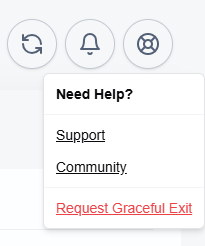

check Stake amount unlocked please claim it and setup fresh node and don’t add stake amount until you get green dot, some storage pieces.
How to manage already registered keys?
ERROR contact:service ping orbital failed {“process”: “storagenode”, “orbital_id”: “1dkRxqhU46NfjV1xJZrxnt8RwWGK2uAas1jtncvZoj4s8HVVK4”, “attempts”: 7, “error”: “ping orbital: failed to ping storage node, your node indicated error code: 0, rpc: tcp connector failed: rpc: tls peer certificate verification: not signed by any CA in the whitelist: CA cert”, “errorVerbose”: “ping orbital: failed to ping storage node, your node indicated error code: 0, rpc: tcp connector failed: rpc: tls peer certificate verification: not signed by any CA in the whitelist: CA cert\n\tsilos3.com/silo/storagenode/contact.(*Service).pingOrbitalOnce:232\n\tsilos3.com/silo/storagenode/contact.(*Service).pingOrbital:169\n\tsilos3.com/silo/storagenode/contact.(*Chore).updateCycles.func1:89\n\tsilos3.com/common/sync2.(*Cycle).Run:102\n\tsilos3.com/common/sync2.(*Cycle).Start.func1:77\n\tgolang.org/x/sync/errgroup.(*Group).Go.func1:93”}
Use this for setup, don’t do it manually until you have proper knowledge.
1 Like